Focus Setup: Engineering Your Environment for Zero-Distraction Deep Work
Your workspace is leaking focus through channels you’ve never noticed — background noise, screen clutter, phone proximity, even room temperature.
Four layers of environmental defence — mapped in the fortress diagram alongside — — mapped in the fortress diagram below — eliminate the friction before willpower has to fight it.
Four layers of environmental defence — each one removes a class of distraction before willpower has to.
Focus setup is the deliberate design of your workspace to remove distractions before they reach you. Your brain processes thousands of ambient signals — light angle, background noise, screen clutter, phone proximity — and each one either supports or sabotages concentration. Getting the environment right before you start working is far easier than fighting distractions once they arrive.
Physical Layer
Your body is sending distress signals you’re ignoring — bad chair angle, wrong screen height, cluttered sightline. Each one bleeds cognitive capacity.
Digital Layer
Every notification costs you 23 minutes of focus recovery. Your phone isn’t a tool during deep work — it’s an adversary.
Sensory Layer
Wrong light temperature suppresses alertness by 30%. Your lighting and soundscape are programming your brain without permission.
Psychological Layer
Your brain encodes location-task associations automatically. Work in bed and your desk feels sleepy. This module rewires that.
30-Day Protocol
Theory without implementation is entertainment. This week-by-week protocol installs all four layers until your environment runs on autopilot.
TLDR: 10 Focus Setup Protocols. 10 Workspace Myths Busted.
Everything below distilled into 20 cards. Deploy the tactics, debunk the myths. The full science follows after.
Why Your Environment Is a Cognitive Parasite
You’ve invested in productivity systems. Time-blocking. Task management apps. Morning routines. Willpower-based approaches demanding you simply “focus harder.”
Yet three hours into your workday, you’ve accomplished almost nothing meaningful. Your attention fragments. Your mind wanders. The cognitive residue from constant task-switching accumulates like plaque in arteries. You feel mentally depleted despite producing minimal output.
Here’s the truth the productivity industry conceals: The problem isn’t you—it’s your environment.
Research from Princeton’s Neuroscience Institute reveals a fundamental truth about human cognition: Your visual cortex processes everything in your field of view whether you consciously attend to it or not. Each object, notification, sound, and visual element creates processing demands on the same limited cognitive resources required for focused work.
When neuroscientists measure brain activity in cluttered environments, they observe what’s called “competitive neural representation”—irrelevant stimuli literally compete with task-relevant information for representation in your visual cortex. Your brain must actively suppress these distractions, and that suppression consumes the identical cognitive resources you need for the work itself.
This is why you feel exhausted after working in chaos, even when you’ve accomplished little. Your brain worked hard—just not on what mattered.
The average knowledge worker loses 2.1 hours daily to environmental interference. Not because they lack discipline, but because their environment is engineered for distraction, not deep work. Every notification ping, every visible email icon, every conversation drifting over from a nearby desk competes directly with executive function, working memory, and sustained attention.
The Cognitive Load Cascade
Your working memory capacity—the mental whiteboard where thinking happens—holds approximately 4±1 items simultaneously. This is fixed biology, not trainable. Every environmental stimulus demanding attention (a buzzing phone, visual clutter, ambient noise) consumes portions of this limited capacity.
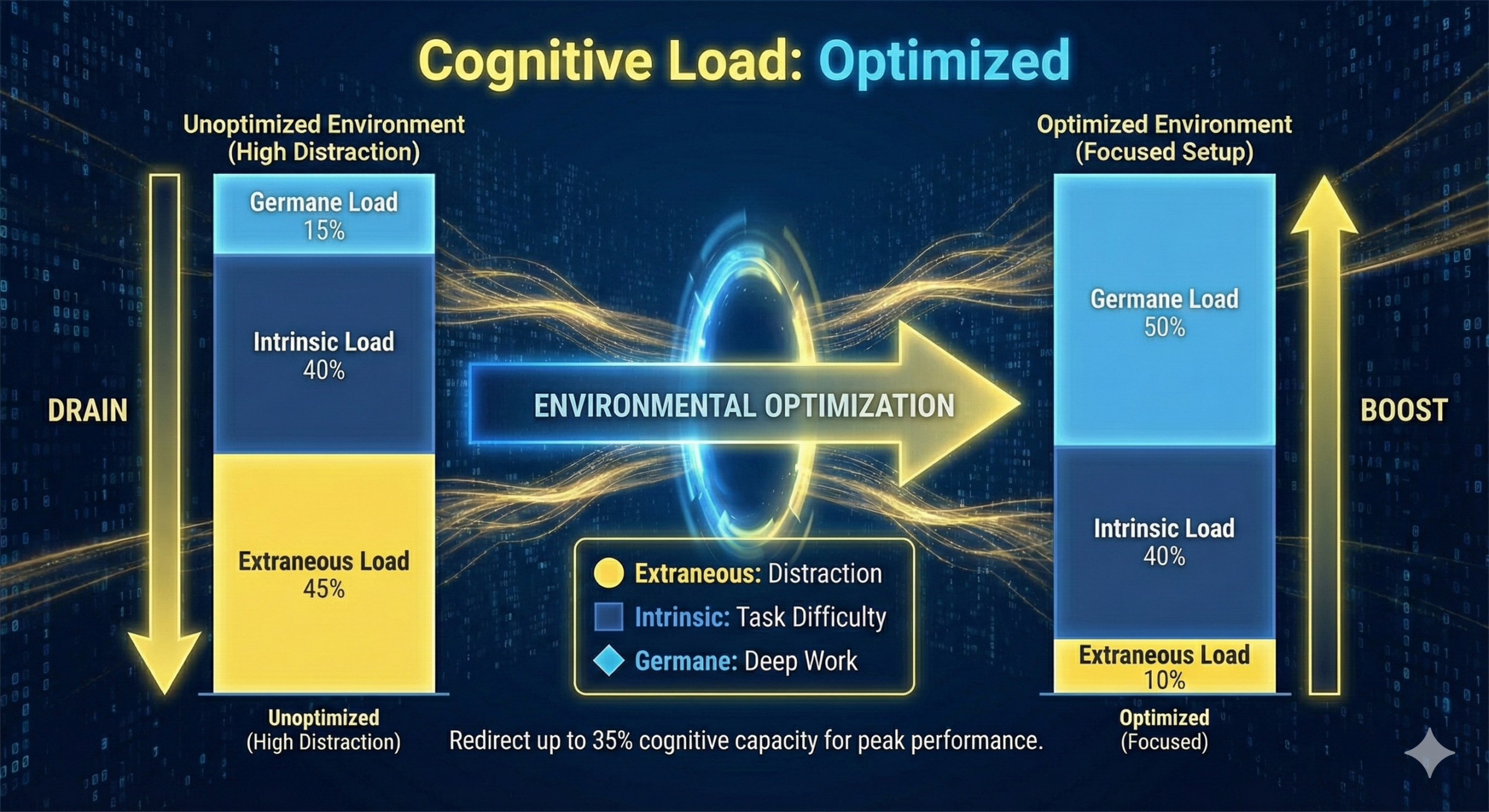
Cognitive Load Theory distinguishes three types of mental processing demands:
- Intrinsic Load: The inherent difficulty of your task—unavoidable and task-dependent.
- Extraneous Load: Processing demands created by poor design or environmental factors—entirely avoidable and our optimization target.
- Germane Load: Mental effort devoted to learning and schema construction—desirable and what we want to maximize.
Poor environmental design floods your system with extraneous load, leaving insufficient capacity for the intrinsic demands of your work and the germane processing that produces insight and mastery.
The Multiplicative Destruction Pattern
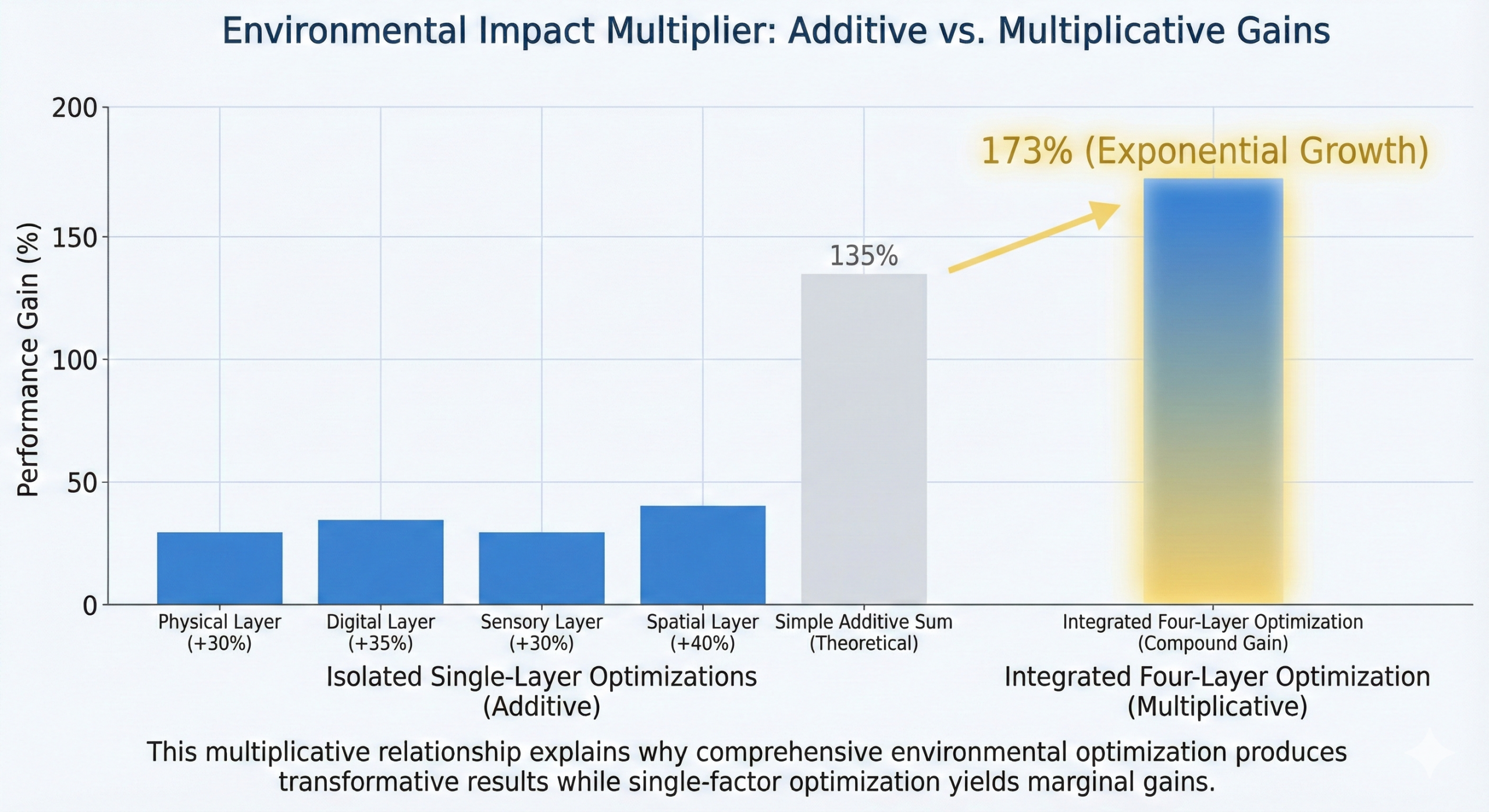
Environmental factors don’t operate independently—they compound multiplicatively. A cluttered desk (visual processing drain) + smartphone presence (effortful inhibition demand) + poor lighting (eye strain and circadian disruption) + ambient noise (involuntary auditory processing) creates exponentially greater cognitive interference than any single factor.
This explains why minor optimizations across multiple environmental layers produce dramatic performance improvements. The system isn’t additive—it’s multiplicative.
This guide provides the complete engineering blueprint for systematically eliminating environmental friction and creating workspace conditions where peak cognitive performance becomes nearly automatic. Whether you work from home, in an office, or across multiple environments—you’ll master the four-layer framework that transforms any space into a focus sanctuary.
Environment design for focus is the systematic optimization of physical, digital, sensory, and psychological workspace factors to minimize cognitive load, eliminate attentional interference, and create conditions conducive to sustained concentration and flow states. It represents the application of environmental psychology, neuroscience, and cognitive architecture principles to workspace engineering.
The Neuroscience of Environmental Influence
Why Your Environment Controls More Than Your Willpower
The persistent myth in performance culture: focus is purely discipline-dependent. If you can’t concentrate, you need more willpower, more grit, more mental fortitude.
Neuroscience tells a different story.
Environmental psychologist Jacqueline Vischer’s landmark research established that physical environments aren’t passive backdrops for work—they’re active modulators of cognitive performance. Your environment continuously broadcasts signals to multiple brain systems about what cognitive mode you should occupy: focused or scattered, creative or analytical, engaged or distracted.
The Attention Network Architecture
Neuroscience research identifies three distinct attention networks, each vulnerable to environmental interference:
Maintains readiness to respond to incoming stimuli. Environmental factors like lighting intensity, color temperature, and thermal comfort directly modulate alerting function through the hypothalamus and reticular activating system.
Selects specific information from sensory input. Visual clutter and unexpected sounds hijack orienting attention through automatic bottom-up processing that bypasses conscious control—you literally cannot prevent your brain from processing these stimuli.
Resolves conflict between competing responses and maintains focus on goals despite distractions. This network, centered in the dorsolateral prefrontal cortex, is most vulnerable to depletion and most severely impaired by environmental cognitive load.
Research using functional magnetic resonance imaging (fMRI) demonstrates that environmental distractions don’t just reduce performance—they fundamentally alter which brain regions activate during cognitive tasks. In high-distraction environments, more neural resources shift toward distraction suppression and less toward task execution.
The Smartphone Cognitive Drain Effect
One of the most striking findings in attention research: A 2017 study published in the Journal of the Association for Consumer Research found that smartphone presence—even when face-down, silent, and powered off—significantly reduces available cognitive capacity.
Researchers tested participants’ working memory and fluid intelligence under three conditions: smartphone on desk, smartphone in bag/pocket, and smartphone in another room. Results demonstrated a clear linear relationship: as smartphone proximity decreased, cognitive capacity increased.
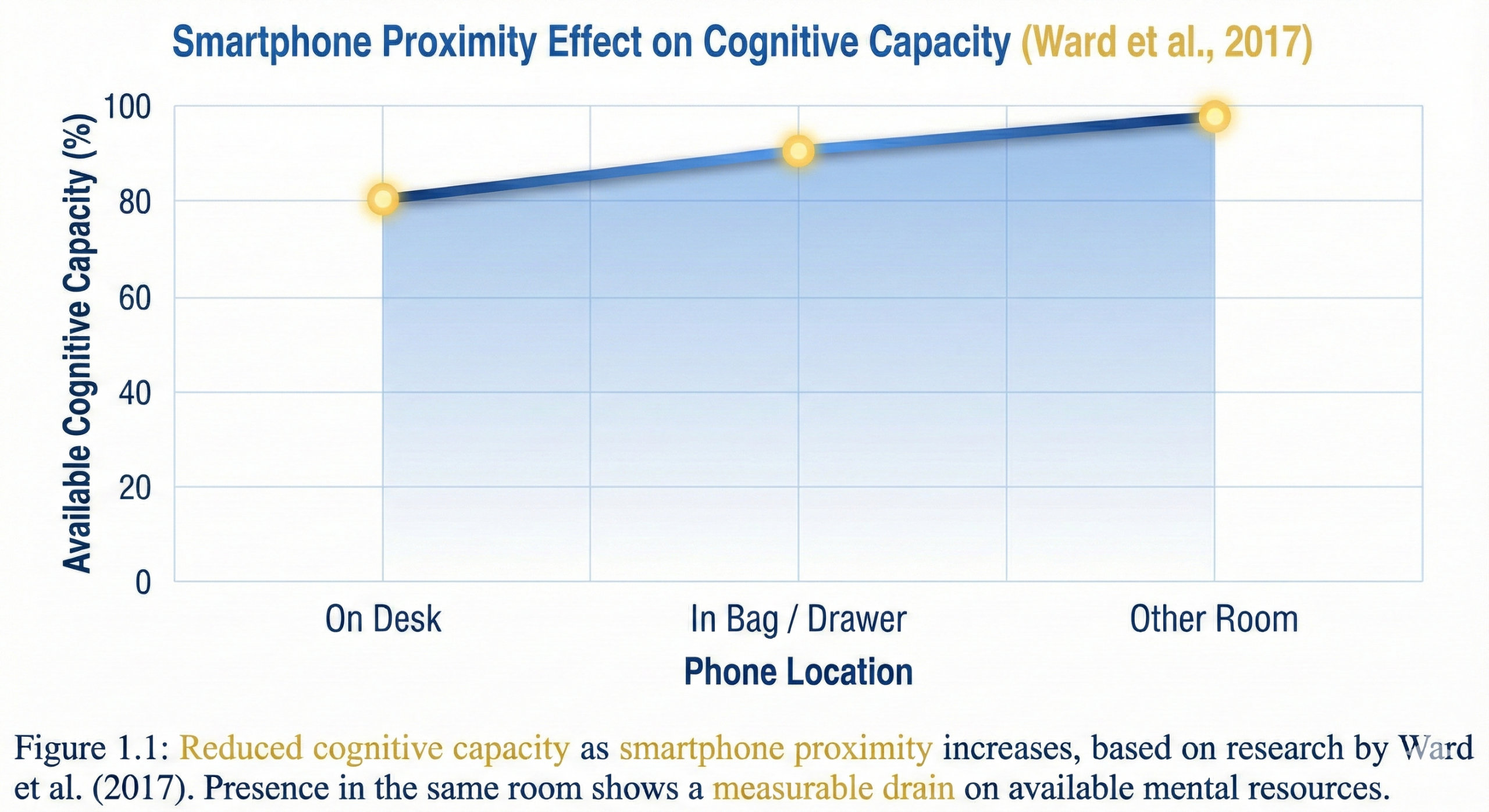
The mechanism: Your smartphone represents what neuroscientists call a “personally relevant stimulus”—an object your brain has learned to associate with social connection, information, and reward through thousands of dopaminergic learning events. This association is so powerful that your brain must actively suppress the urge to check your phone through a process called effortful inhibition, even when you’re not consciously thinking about it.
This suppression isn’t free—it consumes the same limited executive function resources required for complex cognitive work. The effect is strongest for those with highest smartphone dependence, but it affects virtually everyone to measurable degrees.
Studies using electroencephalography (EEG) show that even when people successfully resist checking their phones, brain activity patterns reveal ongoing monitoring and suppression—a continuous cognitive tax that never appears in conscious awareness but reliably degrades performance.
Visual Processing and the Clutter-Cognition Link
The relationship between visual clutter and cognitive performance represents one of the most robust findings in environmental neuroscience. Research using fMRI imaging shows that cluttered environments significantly impair the brain’s information processing capacity through multiple mechanisms.
- Competitive Neural Representation: Your visual cortex processes everything in your visual field, whether you consciously attend to it or not. In cluttered environments, each visible object requires some level of processing to be identified, categorized, and suppressed as task-irrelevant. This creates what researchers call “visual noise”—background neural activity that reduces the signal-to-noise ratio for task-relevant information.
- Working Memory Contamination: Studies demonstrate that visual clutter doesn’t just create distraction—it directly contaminates working memory. Research from Princeton found that physical clutter in the environment competes for attention resources and reduces working memory capacity for cognitive tasks. Participants working in cluttered environments showed both reduced performance and increased activity in brain regions associated with conflict resolution and cognitive control.
- Stress Cascade Activation: UCLA’s Center on Everyday Lives of Families documented a direct correlation between household clutter and elevated cortisol levels, with participants in cluttered environments showing higher stress markers throughout the day. The clutter-stress relationship appears bidirectional: stress leads to clutter (through reduced organization capacity), and clutter increases stress (through visual overload and the psychological weight of uncompleted tasks).
The Attention Residue Mechanism
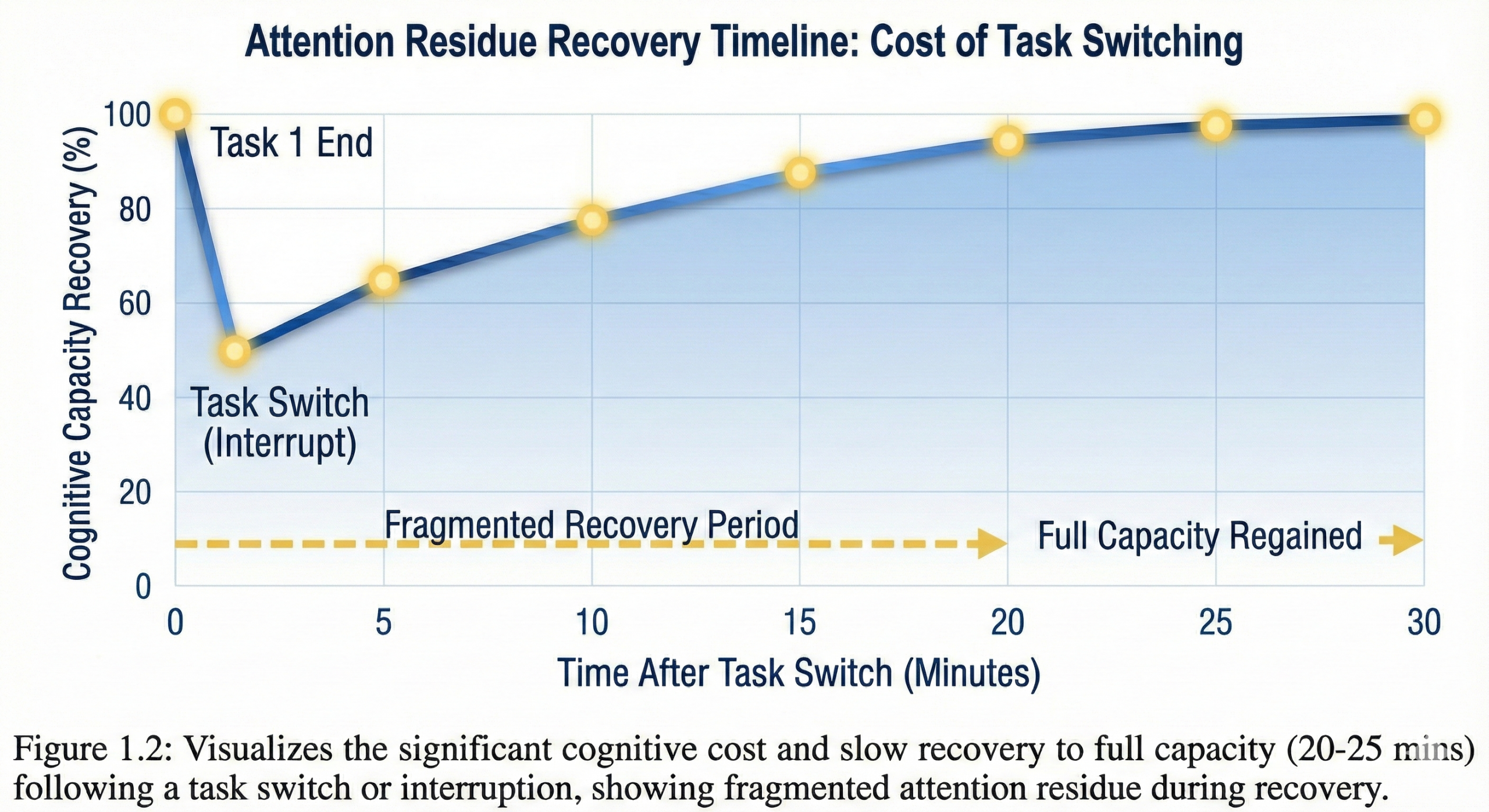
When you switch tasks—even briefly to check a notification—the cognitive cost extends far beyond the interruption duration. Research by Sophie Leroy introduced the concept of “attention residue”: even after switching to a new task, part of your attention remains allocated to the previous task.
Brain imaging studies reveal the mechanism: task switching doesn’t produce clean handoffs between mental processes. Instead, neural networks associated with Task A remain partially activated even after you’ve consciously shifted to Task B. This creates interference—you’re attempting to run Task B on a processor still partially occupied by Task A.
The temporal dynamics are devastating: studies show it takes 20-25 minutes on average to fully regain focus capacity after an interruption. If you check email every 15 minutes (the measured average for knowledge workers), you never achieve full cognitive capacity. You’re perpetually operating with divided attention, even during the intervals between checks.
The Circadian-Environment Interface
Light exposure represents the most powerful environmental signal for circadian rhythm regulation. Specialized cells in the retina called intrinsically photosensitive retinal ganglion cells (ipRGCs) detect light and send signals directly to the suprachiasmatic nucleus—the brain’s master clock.
This system evolved to regulate alertness based on natural light patterns: bright, blue-enriched light in the morning signals “daytime/be alert,” while dimmer, warmer light in evening signals “nighttime/prepare for rest.”
Modern workspace lighting typically violates these biological signals. Indoor environments often provide insufficient light intensity and inappropriate spectral composition, creating chronic circadian misalignment. Research demonstrates that this misalignment doesn’t just affect sleep—it directly impairs daytime cognitive function through reduced alertness, increased fatigue, and dysregulated cortisol rhythms.
Studies comparing lighting conditions found that higher illuminance levels (1000 lux vs. 200 lux) improved subjective vitality, reduced sleepiness, and enhanced performance on sustained attention tasks. The mechanism involves suppression of melatonin production and activation of alertness-promoting brain regions through the circadian system.
Your environment isn’t neutral—it’s a continuous input stream to multiple brain systems governing attention, arousal, stress, and cognitive capacity. Optimization isn’t about willpower over environment. It’s about engineering environmental inputs to support rather than sabotage the biological systems underlying peak performance.
The Four-Layer Framework
Environmental optimization requires systematic intervention across four distinct but interacting layers. Understanding this framework prevents the common mistake of optimizing one layer while ignoring others—an approach that produces minimal results because environmental effects are multiplicative, not additive.
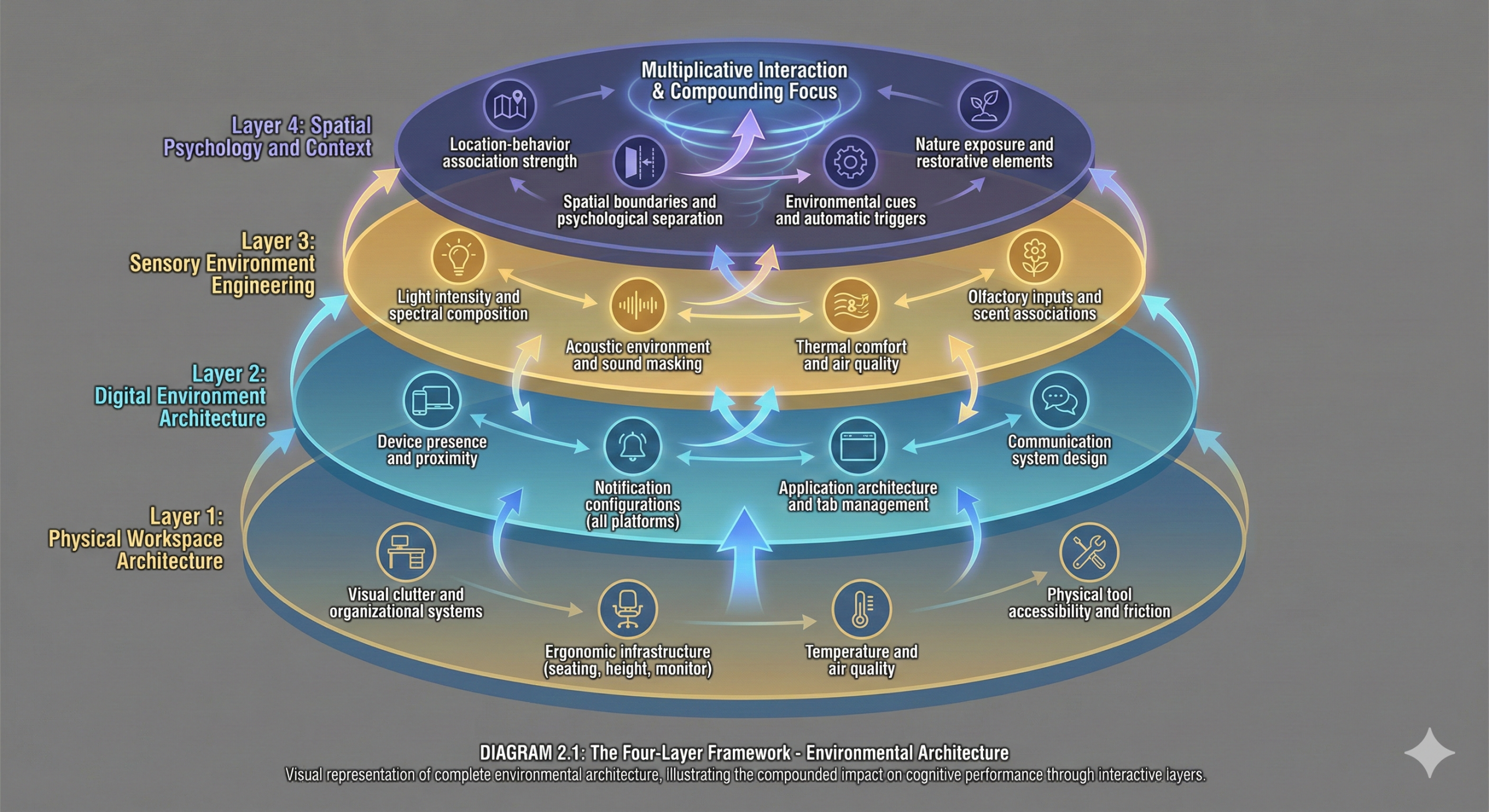
Layer 1: Physical Workspace Architecture
The tangible elements of your environment—furniture, spatial layout, visual organization, ergonomic setup. These affect comfort, visual processing load, and physical efficiency.
- Visual clutter & organization
- Ergonomic infrastructure
- Temperature & air quality
- Physical tool accessibility
- Competitive neural representation
- Physical discomfort signaling
- Activation energy friction
- Near-zero visual load
- Eliminate discomfort drain
- Minimize execution friction
Layer 2: Digital Environment Architecture
Your technological ecosystem—devices, notifications, applications, browser configuration. This layer directly competes for attention through attentional capture mechanisms and creates ongoing cognitive demands through effortful inhibition.
- Device presence & proximity
- Notification configurations
- App architecture & tabs
- Communication protocols
- Attentional capture
- Effortful inhibition
- Attention residue
- Context collapse
- Eliminate interruption vectors
- Remove inhibition stimuli
- Technical barriers to distraction
Layer 3: Sensory Environment Engineering
The continuous sensory inputs your brain processes—lighting, acoustic environment, temperature, air quality, olfactory stimuli. These affect arousal, mood, and cognitive performance through multiple neurological pathways.
- Light intensity & spectrum
- Acoustic environment
- Thermal comfort
- Olfactory inputs
- Circadian regulation
- Arousal modulation (RAS)
- Sensory processing load
- State associations
- Circadian alignment
- Task-appropriate sound
- Eliminate thermoregulation load
Layer 4: Spatial Psychology & Context
The psychological associations your brain creates with specific spaces—context-dependent memory, environmental priming, location-based habit triggers, attention restoration capacity.
- Location-behavior association
- Spatial boundaries
- Environmental cues
- Nature exposure
- Context-dependent memory
- Habit activation
- Attention restoration
- Environmental priming
- Strong location-focus links
- Work/Rest separation
- Automatic priming cues
The Multiplicative Compounding Effect
These four layers interact multiplicatively, not additively. Modest improvements across all layers produce exponentially greater performance gains than perfect optimization of a single layer.
Physical Workspace Systems
The Visual Processing Tax
Research from Princeton demonstrates that visual clutter increases cognitive overload through competitive neural representation. Every visible object in your workspace requires some level of processing—identification, categorization, and suppression as task-irrelevant. This processing occurs automatically and cannot be prevented through conscious effort.
Neuroscientist Sabine Kastner’s work using fMRI revealed that multiple objects in the visual field compete for representation in visual cortex. The brain doesn’t process objects sequentially—it processes them in parallel, with neural resources divided among all visible stimuli. More objects = more divided processing = less capacity for task-relevant information.
The practical implication: Every item on your desk that isn’t directly relevant to your current task is actively degrading your cognitive performance. Not through distraction you could resist, but through automatic neural processing you cannot control.
The UCLA Cortisol Study
Research from UCLA’s Center on Everyday Lives of Families provides quantitative evidence of the clutter-stress relationship. Researchers measured salivary cortisol levels throughout the day in families, correlating physiological stress markers with home environmental factors.
Findings: Direct correlation between clutter density and elevated cortisol, with effects strongest in women. Participants in cluttered environments showed higher stress markers, reported greater tension and anxiety, and demonstrated reduced ability to recover from stress during home time.
The mechanism appears bidirectional: stress impairs organizational capacity (leading to clutter accumulation), while clutter generates stress (through visual processing load and psychological burden of uncompleted tasks). This creates a reinforcing cycle that environmental intervention can break.
Physical Optimization Protocol
The Single-Task Surface Principle
Your primary work surface should contain only items relevant to your current task. Not “relevant generally”—relevant to the specific task you’re executing right now.
Implementation: Before each work session, execute a 60-second surface reset. Remove all items except those required for your next task. Displaced items go into a designated “parking lot” container—not “nearby” but actually out of visual range. At session end, return items to designated homes before retrieving next task materials.
Vertical Organization Architecture
Wall-mounted systems, pegboards, and vertical shelving reduce desktop clutter while maintaining tool accessibility. The key insight: vertical storage removes items from your primary visual field while keeping them within reach when needed.
Research on visual attention demonstrates that items in peripheral vision create less processing demand than items in central vision. Vertical organization exploits this by moving infrequently-used items to peripheral or entirely out of sight.
The Hidden Storage Principle
Out of sight truly equals out of mind. Closed cabinets, drawers, and opaque containers reduce visual processing demands compared to open shelving with visible contents.
Studies comparing workplace environments found that workers in spaces with hidden storage (closed cabinets) reported less stress and showed better task persistence compared to those in spaces with open storage, even when total clutter volume was identical. The critical variable: visibility, not total quantity.
Organizing clutter rather than eliminating it from view. Neatly arranged visible items still create visual processing load. The goal isn’t organization—it’s invisibility of non-essential items.
Ergonomic Infrastructure
Physical discomfort creates a continuous attention demand that cannot be ignored through willpower. Research in occupational health demonstrates that musculoskeletal discomfort doesn’t just affect physical well-being—it directly impairs cognitive performance by consuming attention resources.
Monitor Positioning
Your monitor should be positioned at arm’s length distance with the top of the screen at or slightly below eye level. Improper positioning causes neck strain, eye fatigue, and headaches—all of which create ongoing attention demands that reduce available cognitive capacity.
Screen brightness should approximate ambient lighting to reduce contrast and eye strain. Excessive brightness differential (bright screen in dark room) forces continuous pupillary adjustment and causes fatigue.
Standard configuration: Monitor 20-26 inches from eyes, top edge at eye level or slightly below, screen tilted 10-20 degrees backward. Brightness set to match ambient lighting, with blue light reduction after sunset.
Seating Architecture
Quality seating isn’t luxury—it’s cognitive infrastructure. Your chair should support natural spinal curvature with:
- Adjustable seat height (feet flat on floor, knees at 90°)
- Lumbar support maintaining lower back curve
- Armrests reducing shoulder tension
- Seat depth allowing 2-3 finger gap behind knees
Research demonstrates that ergonomic seating reduces musculoskeletal pain, which in turn improves cognitive performance and reduces attention fragmentation. The investment ROI is measured in daily cognitive capacity preserved.
Movement Integration
Static posture for extended periods reduces blood flow and increases fatigue. Studies show that movement integration—through standing desks, position changes, and brief movement breaks—improves both cognitive function and physical health.
The optimal pattern from research: position change every 30-60 minutes, with brief movement (standing, walking, stretching) every 90 minutes. This aligns with ultradian rhythm cycles and prevents the cognitive decline associated with prolonged sitting.
Movement protocol: Set timer for 90-minute intervals. At each interval, stand and move for 2-3 minutes before returning to work. Consider sit-stand desk or standing desk converter to enable position variation without interrupting focus.
Thermal Environment Control
Cognitive performance peaks within a narrow temperature range. Research identifies optimal thermal comfort around 70-72°F (21-22°C), with performance declining measurably outside this range.
The Mechanism: When ambient temperature deviates from optimal, your body diverts metabolic resources to thermoregulation—the process of maintaining core body temperature. This physiological priority competes with cognitive performance for energy resources. Additionally, thermal discomfort creates ongoing attention demands similar to physical pain.
Studies measuring workplace temperature effects found that both cold and heat exposure impair cognitive performance, with cold exposure particularly detrimental to fine motor tasks (typing, writing) and heat exposure impairing complex decision-making.
Temperature protocol: Set workspace temperature to 70-72°F when possible. Have layers available for personal temperature adjustment. Consider desk fan or space heater for micro-climate control when central systems aren’t optimal. Remember: cold hands impair typing performance—fingerless gloves if needed.
Air Quality and Cognitive Function
Indoor air quality directly affects cognitive performance through oxygen availability and CO2 accumulation. Research from Harvard’s T.H. Chan School of Public Health demonstrated that improved ventilation and reduced CO2 concentrations significantly enhance cognitive function scores.
The study compared cognitive performance in conventional buildings (CO2 ~950 ppm) versus green buildings (CO2 ~550 ppm). Results showed dramatic improvements in decision-making performance, information usage, and strategy in the better-ventilated environments—differences of 60-200% on various cognitive domains.
Air quality protocol: Ensure good ventilation in workspace. Open windows when outdoor air quality permits. Consider air purifier for enclosed spaces without adequate ventilation. Indoor plants provide marginal air quality benefits plus psychological benefits from nature exposure.
Ignoring air quality because it’s invisible. Poor ventilation creates cognitive impairment you cannot consciously detect but reliably degrades performance across all cognitive domains.
Digital Environment Architecture
The digital layer represents the highest-leverage optimization target for most knowledge workers. This is where attention hemorrhages most severely in modern work.
The Smartphone Proximity Effect
Ward et al.’s 2017 research quantified the cognitive cost of smartphone presence through a series of experiments measuring working memory capacity and fluid intelligence under varying conditions of phone proximity.
Experimental Design:
- Condition 1: Phone on desk, face down, silent
- Condition 2: Phone in bag or pocket
- Condition 3: Phone in another room
Results: Clear linear relationship between smartphone distance and cognitive capacity. Participants with phones in another room significantly outperformed those with phones on desks, and slightly outperformed those with phones in pockets/bags.
Critical Finding: These effects occurred even though:
- Phones were powered off or silent
- Participants weren’t consciously thinking about their phones
- Performance impairments happened outside conscious awareness
The mechanism: Your brain has learned through thousands of reinforcement events that your smartphone predicts social connection, information, and reward. This creates what neuroscientists call a “motivationally relevant stimulus”—an object your brain continuously monitors and requires active suppression to ignore.
This suppression—termed effortful inhibition—consumes executive function resources. You’re running a background process that continuously monitors phone location and suppresses the urge to check it, even when you’re not consciously aware of doing so.
Phone protocol: During all focus work, phone goes in another room entirely. Not silent. Not face-down. Not in a drawer. Another room. This is non-negotiable for maximum cognitive capacity. Configure emergency breakthrough settings if genuinely needed (specific contacts can call through Do Not Disturb).
The Notification Interruption Cascade
Research by Stothart et al. demonstrated that notifications impair cognitive performance even when you don’t respond to them. Simply receiving a notification—hearing the sound or feeling the vibration—decreased performance on attention-demanding tasks.
The mechanism: knowing you might receive a notification keeps your brain in a state of partial vigilance, monitoring for incoming signals. This vigilance state consumes attention resources and is fundamentally incompatible with deep focus.
Studies using EEG show measurable changes in brain activity patterns when participants know they might be interrupted, compared to when they know they won’t be. The mere possibility of interruption alters cognitive processing, even before any actual interruption occurs.
The Attention Residue Cascade
When you do respond to notifications, the cost extends far beyond the interruption duration. Leroy’s attention residue research demonstrated that switching tasks leaves residual attention on the previous task, impairing performance on the new task.
The temporal dynamics: after an interruption, it takes an average of 20-25 minutes to fully regain focus capacity. Brain imaging studies reveal why: neural networks associated with Task A remain partially activated even after conscious attention has shifted to Task B.
If you check email every 15 minutes (the measured average for knowledge workers), you never achieve full cognitive capacity. You’re perpetually operating with divided attention and attention residue, even during intervals between checks.
Notification protocol: All devices in Do Not Disturb mode during focus work—not silent, but completely non-notifying. No sounds, no vibrations, no visual banners. Close communication apps entirely (email, Slack, messaging) rather than minimizing them. Schedule specific communication windows (e.g., 9 AM, 12 PM, 4 PM) for batched processing.
Putting phone on silent but keeping it visible. This creates the worst of both worlds—effortful inhibition demands plus the possibility of visual notification capture. Silent ≠ removed from attentional field.
Browser Tab Architecture
Each open browser tab represents an uncompleted task or potential distraction that your brain monitors at some level. Research on the Zeigarnik Effect demonstrates that unfinished tasks remain active in working memory, consuming background cognitive resources until completed or deliberately released.
Thirty open tabs means thirty uncompleted loops your brain is tracking. This creates persistent cognitive load that reduces available working memory for focused tasks.
Neuroscientist Daniel Levitin’s research on information overload demonstrates that even task-relevant information, when excessive, impairs decision-making and creates cognitive fatigue. Browser tabs represent both task-relevant overload (multiple work-related tabs) and task-irrelevant temptation (social media, news, entertainment tabs left open).
Tab management protocol: During focus work, maintain only tabs directly needed for your current specific task. Use tab management extensions (OneTab, Tab Suspender) to save tab collections for later. Create separate browser profiles for work versus personal browsing—different profiles, different contexts, different tab ecosystems.
Communication Architecture
Email and messaging create continuous interruption vectors that most people leave permanently open. Research by Mark et al. found that email checking averages 15 times per day, with each check creating attention residue and context switching costs.
The solution isn’t better email management—it’s architectural redesign of when and how you engage with communication systems.
Communication architecture: Define 2-3 specific communication windows daily (e.g., 9:00 AM, 12:30 PM, 4:30 PM). During these windows, process all email and messaging. Outside these windows, communication apps are closed entirely, not just minimized. Configure auto-responders explaining your communication schedule and providing alternative contact for genuine emergencies.
The Website Blocker Infrastructure
Behavioral economics research demonstrates that humans are poor at resisting temptation through willpower alone. The solution: remove the choice. Technical barriers to distraction work because they eliminate the decision point where willpower traditionally fails.
Studies show that even small amounts of friction (having to type a password, disable a blocker) significantly reduce unwanted behavior. The moment of friction provides an opportunity for prefrontal override of impulsive urges.
Website blocker protocol: Install blocking software (Freedom, Cold Turkey, or browser-specific extensions). Create blocklists for your highest-temptation sites (social media, news, entertainment). Configure automatic blocking during your focus hours. Make the blocker difficult to disable (password protection, nuclear option that prevents all disabling).
Relying on self-discipline rather than technical barriers. Willpower is a depletable resource. Technical infrastructure works when willpower fails. Don’t test yourself against temptation—remove the temptation from possibility.
Sensory Environment Engineering
Photobiology and Cognitive Performance
Light affects cognition through both visual and non-visual pathways. Beyond enabling sight, light exposure directly modulates circadian rhythms, alertness, mood, and cognitive performance through specialized retinal cells called intrinsically photosensitive retinal ganglion cells (ipRGCs).
These cells detect light intensity and spectral composition, sending signals to the suprachiasmatic nucleus (the brain’s master circadian clock) and to brain regions governing arousal and alertness.
Intensity Effects
Research consistently demonstrates that brighter light environments improve alertness and cognitive performance during daytime hours. A systematic review of 59 studies found that both high-intensity white light and blue-enriched light induced alertness, with effects modulated by prior sleep, time of day, and task complexity.
The mechanism: bright light suppresses melatonin production and activates alertness-promoting neural circuits through the circadian system. Light signals “daytime” to your brain, increasing arousal and cognitive engagement.
Studies comparing lighting conditions found that higher illuminance (1000 lux vs. 200 lux at eye level) improved subjective vitality, reduced sleepiness, and enhanced performance on sustained attention tasks.
Color Temperature Effects
Light color temperature, measured in Kelvin (K), modulates cognitive effects:
- Cooler light (5000-7000K, blue-enriched): Promotes alertness, suppresses melatonin, enhances performance on analytical tasks. Mimics natural daylight.
- Warmer light (2700-3000K, yellow/orange-toned): Promotes relaxation, reduces stress markers, may enhance creative thinking. Appropriate for evening work or stress recovery.
Research demonstrates task-specific optimal lighting: cooler, brighter light for analytical work requiring sustained attention; warmer, moderate light for creative work or evening sessions.
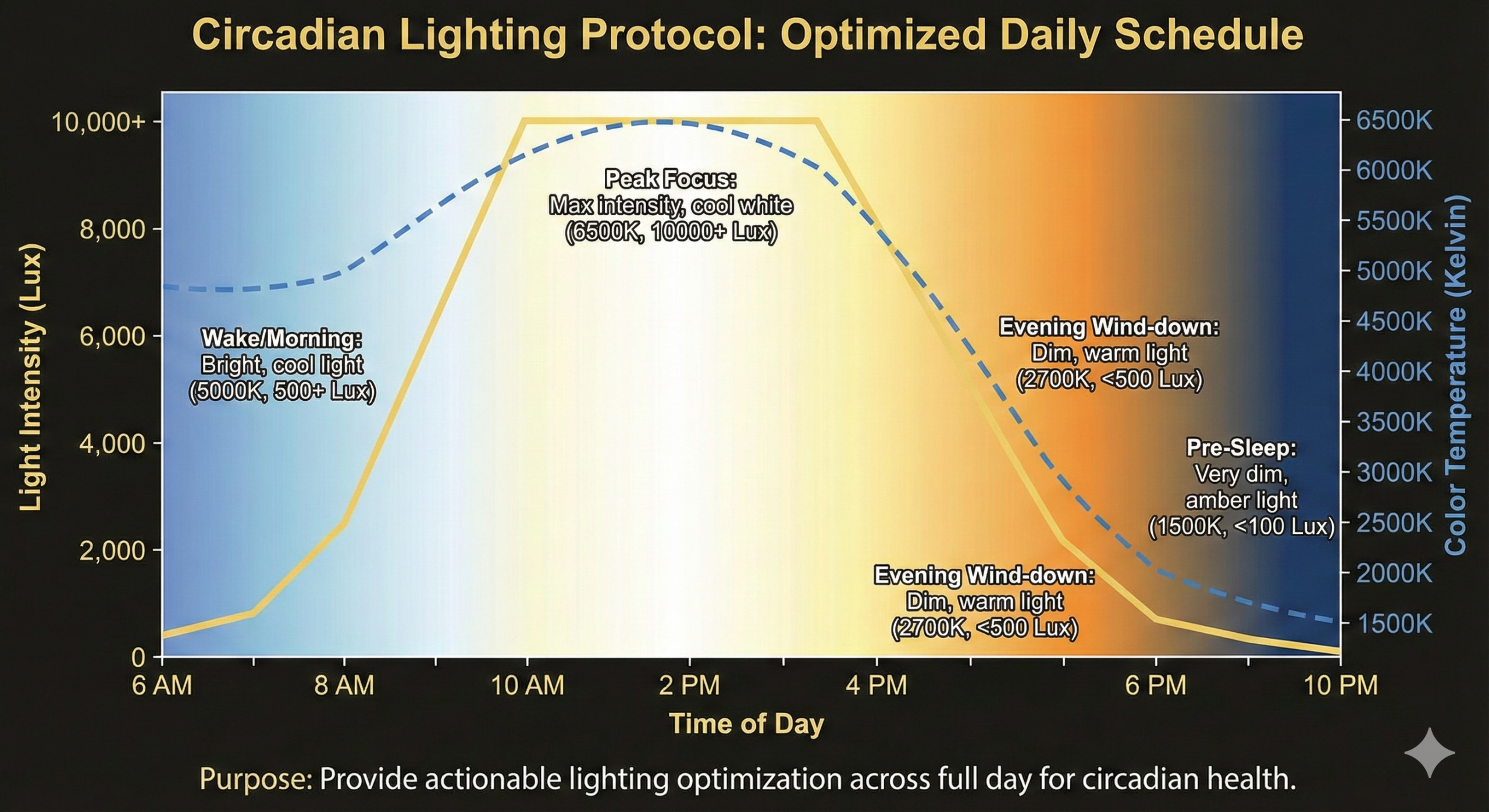
Lighting protocol: Maximize natural light exposure during work hours. Position workspace near windows when possible. Supplement with bright (300-500+ lux at eye level) artificial lighting when natural light is insufficient. Use cooler light (5000K+) for analytical work, especially in morning and midday. Switch to warmer light (3000-4000K) for evening work or creative sessions. Consider programmable smart bulbs for automatic adjustment throughout day.
Acoustic Environment Architecture
Sound profoundly affects cognitive performance, but the relationship is complex and task-dependent. Different types of work require different acoustic conditions for optimal performance.
The Irrelevant Speech Effect
The most cognitively disruptive sound: intelligible speech that you can understand but isn’t relevant to your task. Research on the irrelevant speech effect demonstrates that understandable speech automatically activates language processing systems, even when you’re trying to ignore it.
The mechanism: your brain cannot prevent itself from processing speech. Language comprehension is automatic—you literally cannot hear words without understanding them (in languages you speak). This automatic processing competes directly with tasks requiring language processing: writing, reading, complex reasoning.
Studies comparing noise conditions found that intelligible speech reduced performance more dramatically than other noise types, even when participants reported not being consciously bothered by it. The interference occurs at an unconscious, automatic level.
The Moderate Noise Creativity Paradox
Surprisingly, research demonstrates that moderate ambient noise can enhance certain types of cognitive performance. A study published in Journal of Consumer Research found that moderate ambient noise (~70 decibels, equivalent to coffee shop background noise) enhanced creative cognition compared to both low noise and high noise conditions.
The proposed mechanism: moderate noise creates sufficient cognitive “disfluency” to prompt more abstract thinking, which benefits creativity. Complete silence keeps thinking concrete; too much noise overwhelms processing; moderate noise hits the sweet spot for creative processing.
Sound protocol varies by task type:
- Analytical work (coding, data analysis, detailed writing): Silence or consistent, low-level background noise (white noise, rain sounds). Avoid music with lyrics. Noise-canceling headphones eliminate disruptive environmental sounds.
- Creative work (brainstorming, ideation, conceptual thinking): Moderate ambient noise (coffee shop sounds, lo-fi beats). Light instrumental music may enhance mood and flow.
- Routine work (email, administrative tasks): Personal preference dominates. Some people work fine with podcasts or music; others prefer silence.
Temperature and Thermoregulation
Thermal comfort directly affects cognitive performance through metabolic competition. When ambient temperature deviates from optimal range, your body diverts metabolic resources to thermoregulation—maintaining core body temperature.
This isn’t subtle: research demonstrates measurable cognitive impairment when temperature falls outside the optimal range of approximately 70-72°F (21-22°C).
Studies examining workplace temperature effects found that both cold exposure and heat exposure impair cognitive performance. Cold particularly degrades fine motor performance (typing speed, precision). Heat impairs complex decision-making and strategic thinking.
Temperature protocol: Set workspace to 70-72°F (21-22°C) when possible. Have layers available for personal adjustment. Consider desk fan for cooling or space heater for warming when central systems aren’t optimal. Monitor your personal thermal comfort—individual variation exists around the population average.
Air Quality and Cognitive Function
Indoor air quality affects cognition through oxygen availability and CO2 accumulation. Harvard’s research comparing conventional versus green building environments found dramatic cognitive improvements with better ventilation:
- Conventional buildings: CO2 ~950 ppm, cognitive scores baseline
- Green buildings: CO2 ~550 ppm, cognitive scores 60-200% higher across multiple domains
The mechanism: elevated CO2 reduces oxygen availability for brain metabolism. The brain uses ~20% of the body’s oxygen despite being ~2% of body weight. Reduced oxygen availability impairs cognitive function across all domains.
Air quality protocol: Ensure adequate ventilation. Open windows when outdoor air quality permits. Consider air purifier for enclosed spaces. Monitor CO2 levels if possible (aim for <800 ppm). Indoor plants provide marginal air quality benefits plus psychological benefits from nature exposure.
Hydration and Cognitive Performance
Even mild dehydration (1-2% of body weight) measurably impairs cognitive performance. Research demonstrates effects on working memory, attention, and psychomotor performance.
The problem: thirst lags behind actual hydration needs. You can be cognitively impaired before feeling thirsty. This creates a chronic mild dehydration state in many people.
Hydration protocol: Keep water within arm’s reach during all work sessions. Hydrate proactively, not reactively—don’t wait for thirst. Target 8-10 glasses daily, with additional intake during exercise or in warm environments.
Olfactory Priming
Scent affects cognition through direct connections between the olfactory system and limbic brain regions involved in emotion and memory. Research demonstrates measurable cognitive effects:
- Peppermint: Increased alertness and improved sustained attention task performance
- Rosemary: Enhanced memory performance and cognitive function
- Lavender: Reduced anxiety and promoted calm, useful for high-pressure situations
Scent protocol: Use diffusers or essential oils during focus sessions. Keep scents subtle—overpowering fragrances become distractions. Develop personal scent associations with focus states through consistent pairing (always use the same scent during focus work to create Pavlovian association).
Spatial Psychology and Context Architecture
Context-Dependent Memory and Performance
Research on context-dependent memory demonstrates that information is more easily recalled when retrieval context matches encoding context. The classic “underwater learning” study showed divers remembered information better when tested in the same environment (underwater or on land) where they learned it.
This principle extends to work states: when you consistently work in a specific location, your brain creates powerful associations between that location and focused work. Over time, simply entering that space triggers neural networks associated with work.
The Location-State Association
Neuroscience research reveals that context isn’t just background—it’s encoded as part of memory traces. Your brain doesn’t store information in isolation; it stores information plus the context in which it was processed.
This means location becomes a retrieval cue. Consistently working in the same location for focused tasks creates an association: Location X → Focus State. When you enter Location X, your brain automatically begins activating focus-associated neural networks.
Dedicated workspace protocol: Designate one specific location that means “deep work.” Use this location exclusively for focused work—never for leisure, casual browsing, or relaxation. If you can’t dedicate a room, create specific desk configuration or chair position that serves this role. The goal: build a Pavlovian association between the location and focus state.
Working from multiple locations without dedicated work zones. This weakens location-based associations because no location consistently predicts focused work. Your brain never learns a strong location → focus trigger.
The Bedroom Contamination Problem
Working from bed weakens both sleep associations and focus associations simultaneously. Your bed should exclusively predict sleep (and rest). When you work from bed, you’re training your brain that bed sometimes means work—which makes it harder to sleep when you actually want to.
Research on sleep hygiene consistently identifies “bed exclusively for sleep” as a core principle for healthy sleep architecture. The mechanism: classical conditioning. Your brain learns environmental associations through repeated pairing. Bed + sleep = strong association supporting sleep onset. Bed + work + sleep = weak, confused association impairing sleep onset.
Never work from bed. This is non-negotiable. Separate your work and sleep spaces completely. If space is limited, at minimum use different body positions (sitting for work vs. lying for sleep) and different lighting (bright for work vs. dim for sleep).
Attention Restoration Theory
Attention Restoration Theory (ART), developed by Rachel and Stephen Kaplan, proposes that exposure to natural environments restores depleted attention capacity.
The theory distinguishes two types of attention:
- Directed attention: The effortful focus required for demanding cognitive tasks. This capacity is limited and becomes fatigued with use—similar to muscle fatigue.
- Involuntary attention: The automatic attention captured by inherently interesting stimuli. This doesn’t fatigue because it doesn’t require effortful control.
Natural environments contain what Kaplan calls “soft fascinations”—gently interesting stimuli (clouds, rustling leaves, flowing water) that engage involuntary attention while allowing directed attention to rest and recover.
Research Evidence
Studies testing ART consistently show cognitive benefits from nature exposure. Research by Berman et al. found that a 50-minute walk in a natural environment significantly improved performance on working memory and attention tasks compared to an urban walk.
Remarkably, even viewing images of nature (compared to urban scenes) produces measurable cognitive benefits. This suggests that incorporating natural elements into workspaces may provide ongoing restorative effects.
Nature integration protocol: Incorporate plants into your workspace—even a single plant provides measurable benefits. Position workspace with view of natural elements when possible (trees, sky, gardens). During breaks, view nature scenes or step outside briefly. Consider using nature images or videos as screensavers. The research suggests even minimal nature exposure provides cognitive restoration benefits.
Environmental Priming Effects
Your environment unconsciously primes certain thoughts, behaviors, and states through associations your brain has learned. Research in social psychology demonstrates that subtle environmental cues influence behavior without conscious awareness.
Focus-Conducive Priming Strategies:
- Visual cues: Display objects associated with focus and achievement—books, awards, tools of your trade. These prime goal-directed behavior through automatic associations.
- Symbolic boundaries: A closed door, a “focus in progress” sign, or specific desk arrangement signals “do not disturb” to others and to yourself. These boundaries become psychological triggers through repeated association.
- Consistency: The more consistently your environment predicts focused work, the stronger the automatic priming effect becomes. Consistency trains the association.
Environmental priming protocol: Design your workspace to prime focus rather than distraction. Remove objects associated with leisure or distraction. Add objects associated with your professional identity and goals. Use consistent environmental markers (specific lighting, specific music, specific desk setup) at the start of focus sessions to create automatic state-shift triggers.
The Workspace Optimisation Mastery Protocol
A 90-day systematic programme to engineer, optimise, and permanently maintain a workspace that eliminates environmental friction and protects your cognitive capacity — from initial audit through multi-environment mastery to permanent integration.
Based on Newport, Csíkszentmihályi, Ericsson, and 30+ years of environmental psychology research
Day Complete
Great work on your workspace optimisation practice.
Risks, Limitations
& The Dark Side
Where environment optimisation fails — and the dangers of outsourcing discipline to your desk
Environment design for focus is powerful precisely because it works at the unconscious level — your surroundings shape your attention before you make a single conscious decision. But this power has a shadow side. When you invest heavily in environmental optimisation, you risk building a system that performs beautifully in your controlled space and collapses entirely outside it. The perfectly optimised workspace becomes a crutch that weakens the very cognitive muscles it was designed to support.
Understanding where focus setup fails prevents you from confusing environmental investment with personal capability. What follows is an honest accounting of the costs, the limits, and the contexts where workspace optimisation creates more problems than it solves.
5 Failure Modes
These failure modes affect anyone who invests in workspace optimisation. But for some, environment-centric approaches are genuinely counterproductive.
When to Skip This Approach
If any of these apply, modify the approach or consult a professional before proceeding.
Personal workspace design has limits. The deepest barriers to a focus-friendly environment aren't about your desk — they're about your organisation's architectural choices. This is Part 5 of the Focus Setup guide.
Overconfidence Warning
Active Warning
The Environment-as-Identity Trap
The most insidious risk of focus setup is psychological: you begin to believe your environment is your capability. ‘I can't focus without my setup’ becomes a self-fulfilling prophecy. Every time you fail to focus in a suboptimal environment, it confirms the belief. Every time you succeed in your optimised space, it reinforces the dependency. Over time, you've built a learned helplessness around attention.
Honest self-check — select any that apply:
- You've postponed important work because your ‘focus environment’ wasn't available
- You spend more time optimising your workspace than you spend doing deep work in it
- You feel genuinely unable to concentrate without specific environmental conditions
- You've recommended expensive equipment as essential for focus without caveating constraints
You're showing signs of environmental learned helplessness. Your focus setup is supposed to support your work, not become a prerequisite for it. Train in suboptimal conditions weekly to rebuild your internal attention capacity.
Protection Protocols
Evidence-Based Safeguards
- Do one deep work session per week in a deliberately imperfect environment
- Cap your setup time at 2 minutes — beyond that, you're procrastinating
- Distinguish between environmental factors that help and those you've made yourself need
- Prioritise free, portable optimisations over fixed, expensive ones
System-Level Limitations
Even the best personal workspace can't overcome systemic environmental failures. The deepest barriers to focus are architectural and cultural, not personal.
When individual optimisation hits organisational walls:
What Organisations Can Do Instead
- Workspace design that includes dedicated quiet zones — not as perks, but as core infrastructure for knowledge work
- Flexible hot-desking that includes bookable focus pods — private, sound-treated spaces available on demand
- IT policies that enable focus tools by default — website blockers, notification management, and focus modes pre-approved
- Lighting and climate zone control — individual adjustability in workspace design, not one-size-fits-all settings
- Remote work policies that acknowledge home environments vary — providing equipment stipends rather than assuming all homes are suitable
The goal was never the perfect desk. It was building a brain that can focus anywhere — and an environment that makes it easier.
The risks of focus setup are real: environmental dependency, optimisation procrastination, sensory overload, tool sprawl, and privilege blindspots. Build your environment to support focus, not to substitute for it.
Explore Flow RoutinesYour Questions Answered
16 research-backed answers covering environmental science, physical design, digital hygiene, and getting started — from why environment beats willpower to redesigning your space this weekend.
No questions match your search
Try different keywords or
01Why does environment influence focus more than willpower?
Willpower is a depletable resource that declines throughout the day — environmental design works automatically, requiring zero cognitive effort and protecting focus even when motivation is lowest.
Baumeister's ego depletion research demonstrated that self-control draws from a limited pool. Every time you resist checking your phone, you spend willpower that could fuel deep work. Environmental design removes the need for resistance entirely: if your phone is in another room, there's nothing to resist. Choice architecture research shows that modifying defaults (what's visible, accessible, easy) changes behaviour far more reliably than motivation alone.1Ego depletionJPSP, 74(5), 1252–1265.2NudgeYale University Press.
Google's cafeteria experiment: placing healthy food at eye level and unhealthy food in opaque containers changed eating behaviour more effectively than any nutrition education programme. The same principle applies to focus: making distraction hard and deep work easy changes behaviour without requiring willpower.
Stop trying to resist distractions. Remove them. Environmental design is the only focus strategy that works when you're tired, stressed, or unmotivated.
02What is the four-layer environmental framework?
Optimal focus environments address four layers: physical (workspace layout, ergonomics), digital (notifications, app access), sensory (light, sound, temperature), and spatial psychology (visual complexity, nature, personalisation).
Each layer independently affects cognitive performance. Physical: cluttered desks reduce working memory by 10–15%. Digital: each notification costs 23 minutes of refocusing. Sensory: lighting below 300 lux triggers drowsiness; noise above 70dB impairs complex cognition. Spatial: views of nature restore directed attention; sterile environments deplete it. Addressing all four creates compounding effects — each layer amplifies the others.1Blue or red? Exploring the effect of colorScience, 323(5918), 1226–1229.2The restorative benefits of natureJESS, 15(3), 169–182.
A remote worker optimised all four layers: standing desk at correct height (physical), app blockers 9–11am (digital), 5000K daylight lamp (sensory), desk plant and window view (spatial). Measured focus time doubled from 2.5 to 5 hours per day within 2 weeks — without changing anything about her tasks, goals, or motivation.
Audit all four layers. Most people optimise one (usually digital) and neglect the other three. The compound effect of addressing all four is transformative.
03How does lighting affect cognitive performance?
Light intensity and colour temperature directly regulate alertness via melanopsin receptors — 5000–6500K daylight at 500+ lux during work optimises cortisol, suppresses melatonin, and increases processing speed by 10–15%.
Your brain uses light as its primary circadian signal. Dim, warm light signals evening/sleep mode. Bright, cool light signals daytime alertness. Most office environments provide 300–500 lux — below the threshold for optimal cognitive arousal. Research from Lighting Research Center shows that exposure to 1000+ lux blue-enriched light in the morning improves alertness, mood, and cognitive performance for hours afterward.1Blue-enriched white light in the workplaceScandinavian Journal of Work, 34(4), 297–306.2Office lighting and personal light exposuresSleep Health, 2(3), 204–209.
A programmer replaced his warm-toned desk lamp (2700K, 200 lux) with a 5000K daylight panel (500 lux) positioned at eye level. Self-reported alertness during morning coding sessions increased significantly, and he stopped reaching for a second coffee before 11am.
Invest in a 5000K+ daylight lamp for your workspace. Position it at or above eye level. It's the most underutilised focus intervention.
04What is the ideal noise environment for deep work?
Moderate ambient noise (~50–70 dB) enhances creative tasks, while near-silence (<40 dB) optimises analytical work — and intermittent speech is the single most destructive noise type for focus.
Research published in the Journal of Consumer Research found moderate noise activates diffuse processing (creativity), while silence supports focused analytical work. Critically, the problem isn't volume — it's intelligible speech. Your brain automatically processes language it can understand, consuming working memory involuntarily. Open-plan offices produce 70% more unstructured speech exposure. Noise-cancelling headphones or brown/pink noise generators mask speech while preserving the ambient sound that aids creative thinking.1Is noise always bad? Effects of ambient noise on creative cognitionJCR, 39(4), 784–799.2Office noise and employee concentrationErgonomics, 48(5), 399–517.
A financial analyst in an open-plan office tracked errors: 3x more errors during high-speech periods (colleagues on calls) versus quiet periods. After switching to noise-cancelling headphones with brown noise, error rates dropped to match his home office baseline — in the same noisy environment.
Noise-cancelling headphones with brown or pink noise for analytical work. Moderate café-level ambient for creative work. Never intelligible speech.
05What temperature is best for cognitive performance?
20–22°C (68–72°F) is the optimal range for cognitive work — each degree above 25°C reduces performance by approximately 2%, and each degree below 18°C diverts metabolic resources to thermoregulation.
A landmark study by Seppänen et al. analysed 24 studies and found performance peaked at 21–22°C, with measurable decline above 24°C and below 18°C. The mechanism: thermal discomfort consumes cognitive resources through interoceptive monitoring (your brain tracking body temperature), and overheating reduces cerebral blood flow. Most offices are either too warm (energy-saving settings) or too cold (aggressive air conditioning), creating a persistent cognitive tax.1Room temperature and productivity in office workEnergy and Buildings, 38(4), 2006.2Effects of thermal discomfort on office performanceBuilding and Environment, 46(7), 1578–1588.
A co-working space that set thermostats to 22°C (down from 24°C) documented a 9% reduction in typing errors and a 6% increase in task completion rates across 200 members — no other changes were made.
Set your workspace to 20–22°C. If you can't control the thermostat, use a fan or portable heater to keep your immediate area within range.
06Does desk clutter actually affect cognitive performance?
Yes — visual clutter competes for attentional resources, reducing working memory capacity by 10–15% and increasing cortisol levels. Your brain processes every object in your visual field, whether you're aware of it or not.
Princeton Neuroscience Institute research using fMRI showed that physical clutter in the visual field competes for neural representation, reducing the ability to focus and process information. Each visible object activates attentional circuits — even peripherally. This explains why a clean desk feels calming: fewer objects means less neural competition. The solution isn't minimalism for its own sake — it's ensuring only task-relevant items are visible during focus blocks.1Interactions of top-down and bottom-up mechanisms in visual cortexJournal of Neuroscience, 31(2), 587–597.2No place like home: cortisol patterns in daily home lifePSPB, 36(1), 71–81.
A project manager cleared everything from her desk except her laptop, notebook, and water bottle during flow blocks — storing other items in a drawer. She described the effect as "like putting on mental noise-cancelling headphones." Measured time-to-focus dropped from 12 to 4 minutes.
Clear your desk to task-essentials only before each flow block. Everything else goes in a drawer or behind you.
07Should I use a standing desk?
Alternating between sitting and standing every 30–45 minutes optimises both circulation and cognitive performance — but standing all day increases fatigue, and sitting all day reduces alertness.
A 2016 study in the British Medical Journal found sit-stand desk users reported improved focus, reduced fatigue, and increased energy. The benefit comes from postural variation, not standing itself. Standing increases lower-body circulation (reducing drowsiness) while sitting reduces physical fatigue (preventing distraction from leg discomfort). The optimal protocol: start sessions standing (higher arousal for difficult problems), transition to sitting as the flow state deepens and you want minimal physical distraction.1Effectiveness of sit-stand desksBMJ, 363, k3870.2Using sit-stand workstations to decrease sedentary timePreventive Medicine, 60, 118–122.
An architect uses a motorised sit-stand desk: standing for her 10-minute pre-flow ritual and the first 30 minutes of deep work, then sitting once she's in flow. The standing-to-sitting transition became part of her flow cue — the physical descent mirrors the "settling in" to deep focus.
Get a sit-stand desk if possible, but the movement matters more than the position. Alternate every 30–45 minutes.
08How do I optimise a home office for deep work?
A dedicated room with a closing door, facing away from high-traffic areas, with daylight exposure and a clear desk policy creates a home environment that rivals or exceeds a professional office for deep work.
The key home office advantage is control — you set the temperature, lighting, noise, and interruption policy. The key disadvantage is boundary erosion: home cues (bed, kitchen, family) compete with work cues. Solutions: a door that closes (physical boundary), a dedicated desk used only for work (conditioning), facing a wall or window rather than the room's entrance (reducing visual interruptions), and a clear start/stop ritual that marks transitions.1Associations of cognitive function scores with CO2, ventilationEHP, 123(9), 1.2
A freelance writer converted a walk-in closet into a micro-office: door, desk, daylight lamp, noise-cancelling headphones. Total cost: under £200. Despite the small space, her output doubled compared to working at the kitchen table — the closed door eliminated 90% of household interruptions.
Prioritise a closing door above all else. A small dedicated space with a door beats a large open-plan area every time.
09What are the most important digital tools for focus?
App blockers (Freedom, Cold Turkey), website blockers (LeechBlock), focus modes (iOS/Android), and full-screen work apps are the digital equivalent of putting your phone in another room — they make distraction structurally impossible.
The most effective digital tools work by removing choice: Freedom blocks distracting sites/apps on a schedule you set in advance, making it impossible to access them during flow blocks. Cold Turkey can lock your entire computer to a single application. Distraction isn't a willpower problem — it's an access problem. Every millisecond of available distraction is a millisecond your brain must spend resisting it. Remove the option entirely and the cognitive load vanishes.1A pace not dictated by electronsProceeding of CHI 2012, 555–564.2Brain drainJACR, 2(2), 140–154.
A journalist installed Freedom with a daily 8am–12pm block on social media, news sites, and email. The first week was uncomfortable. By week 3, she stopped noticing. Her morning word count increased 40% — not from typing faster, but from eliminating the 100+ micro-interruptions that fragmented every morning.
Install an app blocker today. Schedule it to match your flow blocks. The discomfort lasts one week; the productivity gain is permanent.
10How do I handle open-plan office noise?
Noise-cancelling headphones with brown or pink noise, strategic desk positioning (facing a wall), and negotiated "focus hours" with your team can recover 60–90% of focus capacity lost to open-plan noise.
Open-plan offices reduce productivity by 15% and increase sick days by 62% according to a study in the Scandinavian Journal of Work. The primary mechanism is involuntary speech processing — your brain cannot ignore intelligible speech nearby. Solutions: active noise cancellation (ANC) headphones eliminate 70–80% of speech; brown noise (low-frequency) masks remaining speech without being fatiguing; facing a wall reduces visual interruptions; and team-level "quiet hours" create social permission to not respond immediately.1The impact of the "open" workspacePTRSB, 373(1753).2Office noise and employee concentrationErgonomics, 48(5), 399–517.
A development team implemented "Deep Work Tuesdays and Thursdays" 9am–12pm: headphones on, Slack status set to DND, no meetings scheduled. Sprint velocity increased 24% with no increase in hours worked — the team simply reclaimed 6 hours of fragmented time per week.
ANC headphones are the single best investment for open-plan focus. Combine with brown noise and team agreements for maximum effect.
11How many monitors should I use for deep work?
One full-screen application on one monitor produces the deepest focus — dual monitors increase information access but also increase task-switching by 18%, fragmenting the sustained attention flow requires.
Dual monitors are excellent for reference-heavy shallow work (comparing documents, coding with documentation). But for deep creative or analytical work, multiple visible windows increase the probability of distraction and task-switching. The optimal approach: use dual monitors for research/reference phases, then switch to single-monitor full-screen mode for deep creation/analysis phases. The shift from multi-window to single-window can itself become a flow cue.1Constant, constant, multi-tasking crazinessProceeding of CHI 2004, 113–120.2A diary study of task switching and interruptionsProceeding of CHI 2004, 175–182.
A UX designer kept Slack, email, and project management visible on her second monitor during design sessions. After switching to single-monitor full-screen mode for deep design work, she noticed fewer context switches and completed mockups in roughly half the time.
Full-screen single-app mode during flow blocks. Save the multi-monitor setup for shallow work and research.
12Does colour affect focus and productivity?
Blue environments enhance analytical tasks and trust, red environments boost attention to detail and physical performance, and green environments promote creative thinking — but the effects are moderate and secondary to lighting and noise.
Mehta and Zhu's research published in Science showed blue backgrounds enhanced creative tasks (brainstorming, ideation) while red backgrounds enhanced detail-oriented tasks (proofreading, data entry). Green environments, particularly living plants or nature views, activate attention restoration. However, these colour effects are weaker than lighting, noise, or temperature effects — prioritise the fundamentals before fine-tuning colour.12Effects of an indoor plant on creative task performanceScandinavian Journal of Psychology, 45(5), 373–381.
An accounting firm painted their detail-review room in soft blue-grey tones and placed plants on windowsills. Error rates on audits dropped modestly (3%) — not transformative alone, but combined with improved lighting and noise management, the total environmental overhaul reduced errors by 18%.
Get lighting, noise, and temperature right first. Then add blue-toned walls and a desk plant for marginal gains.
13How do I create focus zones in a small apartment?
Even a studio apartment can support deep work using contextual cues: a specific chair orientation, a dedicated desk lamp, noise-cancelling headphones, and a ritual that transforms a shared space into a temporary focus zone.
When a dedicated room isn't possible, you create a virtual boundary through consistent sensory cues. The principle: same physical setup + same ritual = same neural association, regardless of space size. Face your desk toward a wall (reducing visual stimulation), use a specific lamp only during work (conditioned cue), wear headphones (auditory isolation), and use a physical marker (a specific coaster, mouse pad, or notebook) that signals "work mode."1Habits — a repeat performanceCurrent Directions in Psychological Science, 21(3), 198–202.2Psychology of habitAnnual Review of Psychology, 67, 289–314.
A graduate student in a studio flat used an IKEA room divider to create a visual boundary, combined with a specific desk lamp and headphones. Her brain learned to treat "divider up + lamp on + headphones in" as the flow trigger. Friends who visited while she worked reported she seemed "in another world" — the contextual cues were doing the work of a closed door.
You don't need a dedicated office. You need dedicated cues. Create a repeatable sensory environment that your brain associates exclusively with deep work.
14What are the 5 cheapest workspace upgrades with the biggest impact?
Noise-cancelling headphones (~£50–100), a daylight desk lamp (~£30), an app blocker (free–£30/year), a desk plant (~£10), and a kitchen timer (~£5) deliver 80% of the environmental benefit for under £200 total.
Each addresses a different layer: headphones (auditory isolation), daylight lamp (circadian arousal), app blocker (digital friction), desk plant (attention restoration via biophilia), kitchen timer (session structure and accountability). None require renovating your space or buying expensive furniture. The timer is particularly underrated — it creates external structure that removes the cognitive load of monitoring time.1Brain drainJACR, 2(2), 140–154.2The restorative benefits of natureJESS, 15(3), 169–182.
A recent graduate on a tight budget implemented all five upgrades in his rented bedroom. Total spend: £165. Daily focus time tracked via RescueTime increased from 2.1 hours to 4.3 hours within 3 weeks. The ROI in productivity was immediate and measurable.
Under £200 gets you 80% of the environmental benefit. Start with headphones and an app blocker — those two alone transform focus.
15How do I audit my current workspace?
Score each of the four layers (physical, digital, sensory, spatial) from 1–10 using a simple rubric, identify the lowest-scoring layer, and fix that first — the weakest layer is your biggest constraint.
Physical: Is your desk clear? Chair ergonomic? Materials accessible? Digital: Are notifications off? Phone removed? App blocker active? Sensory: Is lighting 500+ lux? Temperature 20–22°C? Noise managed? Spatial: Can you see a window/plant? Is visual complexity low? Do you face away from traffic? Score each 1–10 and address the lowest first — it's your performance bottleneck. Re-audit monthly.1NudgeYale University Press.2Cognitive function scores and building factorsEHP, 123(9).
An entrepreneur scored her home office: Physical 8/10, Digital 3/10, Sensory 7/10, Spatial 6/10. The digital layer was the clear bottleneck — she had no app blockers, notifications from 18 apps, and her phone on her desk. Addressing digital alone (30 minutes of setup) produced the largest focus improvement of any single change.
Do the four-layer audit now. Your lowest score is your biggest opportunity. Fix that one layer before optimising anything else.
16What's the weekend workspace redesign protocol?
Saturday morning: audit all four layers and order missing items. Sunday: install upgrades, configure digital tools, clear desk, and test one flow block in the optimised space — you'll start Monday in a transformed environment.
Saturday (2 hours): Complete the four-layer audit. Order any items needed (lamp, plant, headphones). Install app blockers (Freedom, Cold Turkey). Configure phone focus modes. Plan desk layout changes. Sunday (1–2 hours): Implement physical changes. Clear desk to essentials. Position lamp. Set up headphones and brown noise. Remove visual clutter. Run a 60-minute test flow block to calibrate the setup. Adjust anything that felt wrong. Monday: arrive at a workspace already optimised for peak performance.1Deep WorkGrand Central Publishing.2The Power of HabitRandom House.
A marketing manager spent Saturday ordering a daylight lamp and downloading Freedom. Sunday afternoon: rearranged desk facing the window, installed the lamp, configured a daily 9–11am app block, cleared all surfaces. Monday morning she reported her most productive morning session in months — the environment was doing the work.
One weekend to redesign. Monday to benefit. The investment is 3–4 hours for a permanent upgrade to your daily focus capacity.
You've explored all 16 questions
Ready to go deeper? The full Workspace Optimization article provides comprehensive frameworks, implementation protocols, and advanced optimization systems.
Installing Automatic Focus Rituals
From willpower battles to neurological automation — your complete framework for routines that trigger flow on command.
The struggle to start working isn't a discipline problem — it's a missing transition signal. Your brain cannot switch from scanning mode to focused execution without a clear neurological cue.
Your 45 minutes of daily preparation theatre isn't procrastination. It's your default mode network running unchecked because no behavioural script tells it to stand down.
The Compounding Effect
If a 7-minute routine saves 45 minutes of daily theatre and accelerates flow entry by 60% across 250 days, that's 187 recovered hours and dramatically deeper sessions — that's the equivalent of an extra working month — a transformative output gain.
Knowledge Work
Immediate transition from morning routine to deep cognitive output without drift
Creative Practice
Rituals that bypass blank-page paralysis and activate creative flow automatically
Athletic Performance
Pre-performance routines reducing anxiety and increasing confidence under pressure
Team Leadership
Meeting preparation rituals that shift groups from scattered to focused in minutes
The Practice Requirement
Routines only work through repetition, not understanding. Knowing habit neuroscience without daily practice produces nothing — just as understanding brain chemistry without changing nutrition eliminates zero fog.
Your Next Steps
-
TodayDesign Your Starter RoutineChoose one component from each preparation layer: physical, mental, environmental.
-
Next 30 DaysInstall Through Daily PracticeExecute your routine before every focus session for 30 days. Track session quality to measure impact.
-
Next 60 DaysRefine & ExpandAdd advanced habit stacking, build domain-specific variations, extend to multiple daily sessions.
-
6–12 MonthsAchieve Ritual MasteryFull automaticity where the routine triggers focus without conscious effort. Zero preparation theatre.
- Zero preparation theatre daily
- Flow entry in under 10 minutes
- Automatic network switching
- Confidence before every session
- Rituals that compound over years
“Environment is the invisible hand that shapes human behavior.”— James Clear
What You Need to Remember
Your workspace is either an ally or an adversary. There is no neutral.
Environment beats willpower. Always.
Self-control depletes across the day. Environmental design works 24/7 with zero willpower cost. Removing the need for discipline is more effective than strengthening discipline.
Explore: Module 1 — Environment Primacy →Your phone taxes you even when off
Ward et al. (2017): a smartphone in the same room — powered off, face-down — reduces available working memory and fluid intelligence by 10%. The mere visual presence is the trigger.
Explore: Module 1 — Cognitive Cost →One space, one purpose
Using your deep work desk for casual browsing poisons the location-dependent focus association. Dedicated spaces create conditioned responses — your brain starts focusing when your body sits down.
Explore: Module 2 — Space Architecture →Notifications are adversarial by design
Every notification was engineered by a team whose KPI is your engagement, not your focus. Treat push notifications as hostile intrusions into your cognitive workspace, not helpful reminders.
Explore: Module 2 — Digital Threats →The air gap is the single highest-impact intervention
Physical separation — different computer, phone in another room, no internet access — produces the largest measurable focus improvement of any intervention studied. Nothing else comes close.
Explore: Module 3 — Digital Air-Gap →Intermittent human speech kills complex thinking
Open office conversation reduces complex task performance by 25-40%. Consistent background sound (brown noise, rain, instrumental music) masks it. Noise-cancelling headphones are a performance tool, not a luxury.
Explore: Module 3 — Sound Environment →Bright light in, dim light out
Blue-enriched light above 1000 lux during deep work elevates alertness and cortisol. Warm light below 100 lux after 7pm protects melatonin and sleep onset. Manage light like you manage your calendar.
Explore: Module 4 — Light Protocol →Four degrees of temperature determine your output
Cognitive performance peaks between 68-72°F (20-22°C). Below 65°F, your body diverts resources to thermoregulation. Above 77°F, drowsiness and error rates climb measurably.
Explore: Module 4 — Temperature Control →Make deep work the expected default
"Do not disturb" signs, shared calendar blocks, and explicit team agreements about interruption thresholds create social environments where deep work is normal, not an antisocial act.
Explore: Module 5 — Social Environment →Audit everything monthly
Run a 30-minute monthly audit: workspace clutter, digital notifications count, sound environment, light quality, temperature, social interruption frequency. Environments erode gradually — audits catch it.
Explore: Module 5 — Monthly Audit →Continue Your Journey
References
0 sources cited — journal articles, foundational texts, and landmark studies in environmental psychology, workspace design, and cognitive performance
- 1(2016). Associations of cognitive function scores with carbon dioxide, ventilation, and volatile organic compound exposures in office workers. Environmental Health Perspectives, 124(6), 805–812.
- 2(2012). Creativity in the wild: Improving creative reasoning through immersion in natural settings. PLoS ONE, 7(12), e51474.
- 3(2005). Office noise and employee concentration: Identifying causes of disruption and potential improvements. Ergonomics, 48(1), 25–37.
- 4(2008). The cognitive benefits of interacting with nature. Psychological Science, 19(12), 1207–1212.
- 5(2018). The impact of the ‘open’ workspace on human collaboration. Philosophical Transactions of the Royal Society B, 373(1753), 20170239.
- 6(2002). Phototransduction by retinal ganglion cells that set the circadian clock. Science, 295(5557), 1070–1073.
- 7(2014). Impact of windows and daylight exposure on overall health and sleep quality of office workers. Journal of Clinical Sleep Medicine, 10(6), 603–611.
- 8(2010). Can students really multitask? An experimental study of instant messaging while reading. Computers & Education, 54(4), 927–931.
- 9(2012). The impacts of nature experience on human cognitive function and mental health. Annals of the New York Academy of Sciences, 1249(1), 118–136.
- 10(2016). Dynamic lighting system for the learning environment: Performance of elementary students. Optics Express, 24(10), A907–A916.
- 11(2005). The effect of office concepts on worker health and performance: A systematic review of the literature. Ergonomics, 48(2), 119–134.
- 12(2004). Neurocognitive mechanisms underlying the experience of flow. Consciousness and Cognition, 13(4), 746–761.
- 13(2000). Stress and open-office noise. Journal of Applied Psychology, 85(5), 779–783.
- 14(2017). The impact of daytime light exposures on sleep and mood in office workers. Sleep Health, 3(3), 204–215.
- 15(1975). Context-dependent memory in two natural environments: On land and underwater. British Journal of Psychology, 66(3), 325–331.
- 16(2014). Effects of unattended speech on performance and subjective distraction: The role of acoustic design in open-plan offices. Applied Acoustics, 86, 1–16.
- 17(2003). Tracking restoration in natural and urban field settings. Journal of Environmental Psychology, 23(2), 109–123.
- 18(2016). A high illuminance, blue-enriched light intervention increases alertness during the day. Journal of Environmental Psychology, 48, 146–157.
- 19(2011). Open-plan office noise: Cognitive performance and restoration. Journal of Environmental Psychology, 31(4), 373–382.
- 20(1989). The experience of nature: A psychological perspective. Cambridge University Press. Book
- 21(1995). The restorative benefits of nature: Toward an integrative framework. Journal of Environmental Psychology, 15(3), 169–182.
- 22(2013). Workspace satisfaction: The privacy-communication trade-off in open-plan offices. Journal of Environmental Psychology, 36, 18–26.
- 23(2011). Quantitative measurement of productivity loss due to thermal discomfort. Energy and Buildings, 43(5), 1057–1062.
- 24(2015). 40-second green roof views sustain attention: The role of micro-breaks in attention restoration. Journal of Environmental Psychology, 42, 182–189.
- 25(2009). Why is it so hard to do my work? The challenge of attention residue when switching between work tasks. Organizational Behavior and Human Decision Processes, 109(2), 168–181.
- 26(2018). Light, alertness, and alerting effects of white light: A literature overview. Journal of Biological Rhythms, 33(6), 589–601.
- 27(2005). No task left behind? Examining the nature of fragmented work. Proceedings of the SIGCHI Conference on Human Factors in Computing Systems, 321–330.
- 28(2008). The cost of interrupted work: More speed and stress. Proceedings of the SIGCHI Conference on Human Factors in Computing Systems, 107–110.
- 29(2012). “A pace not dictated by electrons”: An empirical study of work without email. Proceedings of the SIGCHI Conference on Human Factors in Computing Systems, 555–564.
- 30(2011). Interactions of top-down and bottom-up mechanisms in human visual cortex. Journal of Neuroscience, 31(2), 587–597.
- 31(2012). Is noise always bad? Exploring the effects of ambient noise on creative cognition. Journal of Consumer Research, 39(4), 784–799.
- 32(2003). Aromas of rosemary and lavender essential oils differentially affect cognition and mood in healthy adults. International Journal of Neuroscience, 113(1), 15–38.
- 33(2014). Reducing occupational sedentary time: A systematic review and meta-analysis of evidence on activity-permissive workstations. Obesity Reviews, 15(10), 822–838.
- 34(2014). The relative benefits of green versus lean office space: Three field experiments. Journal of Experimental Psychology: Applied, 20(3), 199–214.
- 35(2009). Cognitive control in media multitaskers. Proceedings of the National Academy of Sciences, 106(37), 15583–15587.
- 36(2010). Water, hydration, and health. Nutrition Reviews, 68(8), 439–458.
- 37(2013). Office ergonomics training and a sit-stand workstation: Effects on musculoskeletal and visual symptoms and performance of office workers. Applied Ergonomics, 44(1), 73–85.
- 38(2011). Computer vision syndrome: A review of ocular causes and potential treatments. Ophthalmic and Physiological Optics, 31(5), 502–515.
- 39(2010). No place like home: Home tours correlate with daily patterns of mood and cortisol. Personality and Social Psychology Bulletin, 36(1), 71–81.
- 40(2014). Concentration requirements modify the effect of office type on indicators of health and performance. Journal of Environmental Psychology, 38, 167–174.
- 41(2013). Daytime light exposure and feelings of vitality: Results of a field study during regular weekdays. Journal of Environmental Psychology, 36, 270–279.
- 42(2015). The attentional cost of receiving a cell phone notification. Journal of Experimental Psychology: Human Perception and Performance, 41(4), 893–897.
- 43(1988). Cognitive load during problem solving: Effects on learning. Cognitive Science, 12(2), 257–285.
- 44(2015). The neuroscience of mindfulness meditation. Nature Reviews Neuroscience, 16(4), 213–225.
- 45(1984). View through a window may influence recovery from surgery. Science, 224(4647), 420–421.
- 46(1991). Stress recovery during exposure to natural and urban environments. Journal of Environmental Psychology, 11(3), 201–230.
- 47(2008). Towards an environmental psychology of workspace: How people are affected by environments for work. Architectural Science Review, 51(2), 97–108.
- 48(2017). Brain drain: The mere presence of one’s own smartphone reduces available cognitive capacity. Journal of the Association for Consumer Research, 2(2), 140–154.
- 49(2017). Smartphones and cognition: A review of research exploring the links between mobile technology habits and cognitive functioning. Frontiers in Psychology, 8, 605.